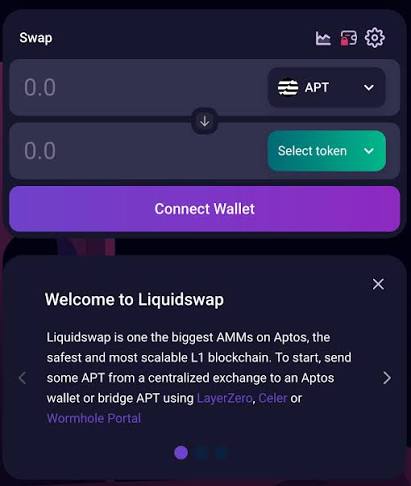
The mental model: with a centralized exchange you register an account and the platform holds your keys. With Liquidswap you connect a non-custodial wallet — the keys live with you. That means no password reset, no support desk, and no one who can freeze or recover your funds but you. It is more freedom and more responsibility at the same time.
Why there is no "sign up" button
People search for a "Liquidswap login" or "Liquidswap registration" page and get confused when they can't find one. There isn't one, and that's by design. A decentralized exchange is just smart contracts on Aptos. There is no database of users, no email field, no "forgot password" flow, because there is no company sitting between you and the pool. Your wallet address is your identity, and connecting it is the entire "login".
This is the moment the custodial-vs-non-custodial distinction stops being theory. On a centralized exchange, losing your password is an inconvenience — you reset it. In a self-custody wallet, losing your seed phrase is final. So before you connect anything, understand what you are taking responsibility for.
It also changes how you should think about privacy. Because your address is public, everything it does is visible forever on the Aptos ledger — every swap, every balance, every counterparty. That's not a flaw; transparency is the point of a public blockchain. But it means an address is a persistent identity. Serious users keep separate addresses for separate purposes, which we cover below. For now, just hold the core idea: connecting a wallet is not "signing up" — it's introducing an identity you fully own and fully answer for.
Connecting a wallet, step by step
Choose a well-known Aptos-compatible wallet from its official source only. Type the URL yourself or use a bookmark — never install from an ad or a link someone sent you.
The wallet generates a seed phrase. Write it down on paper, offline, before continuing. This is the only backup that exists — nobody can regenerate it for you.
Select your wallet from the list. A popup asks you to approve the connection — read exactly what it requests. Connecting is free and does not move funds; be suspicious of anything asking otherwise.
No email, no password. Your address is now linked for this session. On a shared or public device, disconnect when you're done and lock the wallet extension.
Which wallet should you use?
We don't push a specific brand — the right answer depends on how much you're securing. The categories matter more than the logos:
- Browser-extension / mobile wallets are convenient and free, and fine for small, active balances. They are "hot" wallets — connected to the internet — so treat them as a spending account, not a vault.
- Hardware wallets keep your keys on a physical device that never exposes them to your computer. For any meaningful amount, this is the single biggest upgrade you can make. You still sign Liquidswap transactions, but the private key never touches an internet-connected machine.
Whatever you pick, confirm it genuinely supports the Aptos network before you rely on it. A wallet that only speaks Ethereum can't connect to an Aptos DEX.
What "connect wallet" actually exposes
A lot of anxiety around connecting a wallet comes from not knowing what the click actually does. Here's the honest breakdown:
- Connecting shares your public address only. The site can now see your address and its public balances — the same information anyone can read on a block explorer. It cannot move funds just from a connection.
- Signing is where power is granted. A signature can be a harmless message (proving you own the address) or a transaction that moves tokens or grants a spending allowance. This is the step to scrutinise.
- Token approvals persist. When you allow a contract to spend a token, that permission can outlive the session. Approve only what a specific swap needs, and periodically review and revoke old approvals.
The takeaway: a connection is low-risk; a careless signature is high-risk. Slow down at the signing prompt and read it. If your wallet shows a plain-language summary of what you're approving, use it. If something asks for far more access than the task in front of you, reject it.
Protecting your seed phrase
Your seed phrase — usually 12 or 24 words — is the master key to everything. Anyone who has it owns your wallet, full stop. Treat it like the deed to your house, not like a password you can change later.
Not support, not an “airdrop”, not a wallet update, not a moderator in a chat. The moment a site or person asks for those words, it is a scam — 100% of the time. Close it immediately. A real wallet only ever asks you to re-enter the phrase when you deliberately restore a wallet from scratch.
Backup and recovery, done properly
Because there's no reset button, your backup is your account. Getting this right once saves you from the most common catastrophic loss in crypto: not a hack, but a wallet that can't be restored after a lost phone or a wiped laptop.
When the wallet first shows your seed phrase, write it down on paper by hand. Don't photograph it, don't paste it anywhere digital.
One copy can be destroyed by fire, flood or simple loss. Keep at least two copies in separate secure locations; a metal backup plate survives disasters paper won't.
Restore the wallet from your written phrase on a fresh install before you deposit anything meaningful. If it restores cleanly, your backup works. Better to find a mistake with $0 at stake.
"Importing" a wallet simply means typing that same seed phrase into a compatible wallet to regain access — which is exactly why the phrase must never touch an internet-connected surface except during a deliberate restore you initiated.
Spotting phishing before it costs you
The protocol itself rarely gets hacked; people get phished. The attacks are boringly consistent, which means they are avoidable once you know the pattern:
- Fake front-ends. A clone site with a near-identical URL asks you to connect and then requests a malicious signature. Bookmark the real site and use only that.
- Malicious signature requests. Read what your wallet is actually asking you to sign. If it grants blanket approval over a token rather than executing the specific swap you intended, reject it.
- "You won an airdrop" tokens. Random tokens that appear in your wallet are bait. Interacting with them can trigger a drainer. Ignore and hide them.
- Urgency and DMs. Anyone rushing you, or messaging you first about "support", is running a script. Real protocols don't DM you.
Multi-wallet hygiene: don't put everything in one address
A habit that separates careful users from stressed ones is compartmentalising across more than one wallet. It costs nothing and dramatically limits the damage of a single mistake:
- A "hot" spending wallet with a small balance for day-to-day swaps and connecting to apps. If it's ever compromised, the loss is capped.
- A "vault" wallet — ideally on a hardware device — that holds the bulk of your funds and connects to almost nothing. You move funds to the hot wallet only when you need them.
Think of it like carrying a little cash in your pocket while your savings stay in the bank. The connection risk we discussed earlier lives almost entirely on the hot wallet, so your long-term holdings never sit behind a browser extension that talks to dozens of sites. It's a small amount of extra friction for a large amount of peace of mind.
If you also use a centralized exchange: enable 2FA
On a custodial exchange you do have an account — so lock it down. Turn on app-based 2FA (an authenticator app, not SMS, which is vulnerable to SIM-swaps), use a unique password from a password manager, and enable withdrawal-address whitelists where offered. It's the single cheapest security upgrade you can make, and it protects the on-ramp you'll use to fund your on-chain activity in the first place.
Remember: your seed phrase secures your self-custody wallet; 2FA secures your exchange account. They are different locks on different doors. You need both if you use both.
Skip wallet setup entirely and convert between assets with a straightforward, account-based flow — useful for a first move while you learn self-custody.